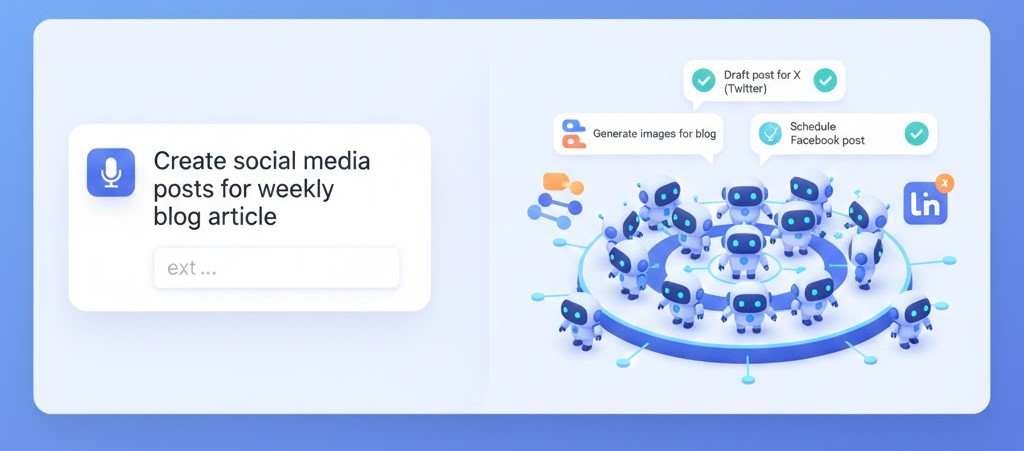
Lindy AI & Agent Swarms (The Simplest Way)
If you hated every automation tool so far, this one's for you.
For People Who Hate Technology
Make.com: Too many buttons and modules
n8n: Too technical, too many nodes
Relevance AI: Too expensive, too complex
Lindy AI: You describe what you want. It builds it. Done.
The Paradigm Shift
Every other tool:
- Drag modules
- Configure 47 settings
- Map data fields
- Add error handling
- Test and debug
- Fix for 3 hours
- Finally works
Lindy AI:
- "I want an agent that reads my emails and drafts responses."
- It's ready.
What Is Lindy AI?
Think of it as hiring an AI assistant through conversation instead of building a robot.
You: "I need help managing my inbox."
Lindy: "What would you like me to do with your emails?"
You: "Draft responses to customer questions."
Lindy: "What tone should I use?"
You: "Professional but friendly."
Lindy: "Got it. Your agent is ready. Want to test it?"
No code. No modules. No complexity.
The Catch (There's Always One)
Price: $50/month after 7-day free trial
Limitations compared to other tools:
- Less customization than n8n
- Fewer integrations than Make.com
- Simpler than Relevance AI
- Can't handle extremely complex workflows
Best for:
- Non-technical people
- Quick simple automations
- Email and calendar tasks
- People who value simplicity over everything
Not for:
- Complex enterprise workflows
- Custom integrations
- Advanced AI orchestration
- Engineers who want full control
Getting Started (10 Minutes)
Step 1: Sign Up
- Go to lindy.ai
- Click "Sign Up"
- Enter email
- Verify email
- Start 7-day trial
No credit card needed for trial.
Step 2: Browse Templates
Lindy has ready-made agents to get you started:
Email Management:
- Customer Support Responder
- Meeting Scheduler
- Email Organizer
- Newsletter Creator
- Cold Email Follow-up
Productivity:
- Meeting Prep Assistant
- Task Manager
- Calendar Optimizer
- Daily Briefing Creator
Content:
- Social Media Manager
- Content Repurposer
- Blog Post Promoter
- LinkedIn Post Writer
Pick one to start. Don't try to set up everything day 1.
Building Your First Lindy Agent
Let's build an email assistant that drafts responses.
The Conversational Setup
-
Click "Create New Lindy"
-
Lindy asks: "What would you like me to do?"
-
You type:
Monitor my support@mycompany.com inbox for customer questions.
When you find one, draft a helpful response.
Use a friendly professional tone.
Always end with "Let me know if you need anything else!"
Do NOT respond to refund requests or complaints - flag those for me.
-
Lindy asks follow-up questions:
- "Should I send responses automatically or let you review first?"
- "What email should I monitor?"
- "Any specific topics I should handle differently?"
-
You answer:
- "Let me review all responses first for the first week"
- "support@mycompany.com"
- "For technical issues, always offer to create a support ticket"
-
Lindy: "Perfect! Your agent is ready. Want to send a test email?"
That's it. No modules, nodes, or configuration screens.
Testing Your Agent
- Send a test email to your support address
- Wait 1-2 minutes
- Check Lindy dashboard
- Review the drafted response
- Click "Approve" or "Edit"
If the response isn't perfect, just tell Lindy:
"The tone is too formal. Be more casual and friendly, like talking to a friend."
Lindy adjusts immediately. No prompt engineering. Just normal conversation.
What Makes Lindy Different
1. Natural Language Configuration
Other platforms:
[Module 1: Gmail Trigger]
├─ Authentication: OAuth2
├─ Polling interval: 5 minutes
├─ Label filter: inbox
├─ Max results: 10
└─ Include spam: false

[Module 2: OpenAI]
├─ Model: gpt-4o-mini
├─ Temperature: 0.7
├─ Max tokens: 500
└─ Prompt: [Write complex prompt with variables]

[Module 3: Gmail Send]
├─ To: {{from}}
├─ Subject: Re: {{subject}}
└─ Body: {{output}}
Lindy:
"Draft friendly responses to customer emails."
Result: Same outcome, 98% less complexity.
2. Smart Defaults
Lindy assumes sensible settings automatically:
- Checks email every 5 minutes
- Uses GPT-4 for better responses
- Handles errors gracefully (retries, notifications)
- Learns your preferences over time
You only override when you have specific needs.
3. Learning from Feedback
Edit a response? Lindy learns.
Example:
- Week 1: Lindy drafts response
- You edit: Remove corporate jargon, add emoji
- Week 2: Lindy starts using less jargon, adds appropriate emojis
- Week 3: Responses match your style perfectly
After 20-30 interactions, Lindy knows your preferences better than you do.
Agent Swarms: Multiple Lindys Working Together
Here's where Lindy gets powerful: multiple agents collaborating.
The Concept
Instead of one mega-agent doing everything, create specialized Lindys that work together.
Example: Content Marketing Swarm
Lindy 1 - Content Creator: "Monitor our blog RSS feed. When new post published, extract key points and create a summary."
Lindy 2 - Social Media Manager: "Take content from Lindy 1 and create:
- 5 tweet variations
- 1 LinkedIn post
- 1 Instagram caption"
Lindy 3 - Post Scheduler: "Take posts from Lindy 2 and schedule them:
- Tweets: Post over 3 days at 9am, 2pm, 6pm
- LinkedIn: Post on Tuesday 10am
- Instagram: Post on Wednesday 3pm"
Lindy 4 - Engagement Monitor: "Track all posts from Lindy 3. Alert me to comments and high-engagement posts that need my attention."
Result: Complete content distribution system, built by describing what you want in 4 conversations.
Example: Sales Swarm
Lindy 1 - Lead Qualifier: "When new contact form submitted, research the company and score them 1-10."
Lindy 2 - Meeting Scheduler (for high scores): "If Lindy 1 scores lead 8-10, send personalized email with Calendly link."
Lindy 3 - Follow-up Specialist (for medium scores): "If Lindy 1 scores lead 5-7, add to nurture sequence. Send helpful content weekly."
Lindy 4 - Meeting Prep: "For meetings scheduled by Lindy 2, prepare brief 1 hour before: company background, talking points, questions to ask."
Each Lindy focuses on one task. Together, they automate your entire sales funnel.
Advanced Lindy Techniques
Technique 1: Conditional Logic Through Conversation
You: "Handle customer emails, but treat VIP customers differently."
Lindy: "How should I identify VIP customers?"
You: "Check if their email domain matches our VIP list: company1.com, company2.com, company3.com. For VIPs, always start with 'Thank you for being a valued partner' and prioritize their requests."
Lindy: "Got it. I'll treat those domains as VIPs with special handling."
No "IF/ELSE" statements. Just explain what you want.
Technique 2: Multi-Step Workflows
You: "When someone books a meeting, I want you to:
- Send them a confirmation email with the Zoom link
- Add the meeting to my calendar
- Create a preparation doc in Notion with their info
- Remind me 1 hour before with key talking points"
Lindy: "Should I research the attendee before creating talking points?"
You: "Yes, check their LinkedIn and company website."
Lindy: "Perfect. All set up."
Complex 4-step workflow with research, built in one conversation.
Technique 3: Feedback Loops
You: "If I reject your draft more than 2 times, ask me what's wrong so you can adjust."
Lindy: "Will do. I'll learn from the patterns."
This meta-instruction helps Lindy learn proactively.
Real-World Use Cases
Use Case 1: Solopreneur Email Management
Sarah, freelance designer:
- Gets 30-50 emails/day
- Project inquiries, client questions, invoices
Her Lindy setup:
- Lindy 1: Sorts emails into Projects, Inquiries, Admin
- Lindy 2: Drafts responses to client questions
- Lindy 3: Sends invoices on project completion
- Lindy 4: Weekly summary of all activity
Time saved: 8 hours/week
Cost: $50/month
ROI: 1,500%
Use Case 2: Small Agency Client Communication
Marketing agency, 15 clients:
Their Lindy swarm:
- Client Manager Lindys (15 total, one per client):
- Each knows client's preferences, history, team
- Drafts updates and reports
- Schedules check-ins
- Alerts about issues
- Project Coordinator Lindy:
- Tracks all deliverables across clients
- Sends reminders
- Updates project management tool
Result: Every client feels like they have a dedicated account manager (they kind of do - an AI one).
Use Case 3: Content Creator Automation
YouTuber with newsletter:
The swarm:
- Lindy 1: When new video published, transcribe it
- Lindy 2: Turn transcript into newsletter
- Lindy 3: Create 10 social media posts promoting video
- Lindy 4: Schedule all posts
- Lindy 5: Monitor comments, flag questions for creator
Time saved: 6 hours per video
Videos per week: Went from 1 to 3 (same time investment)
Cost-Benefit Analysis
Pricing
7-day free trial: Full access
Pro: $50/month (unlimited Lindys)
Team: $100/month (shared Lindys, collaboration)
What's Included
- Unlimited agents
- Unlimited executions (fair use)
- All integrations
- Email, calendar, Slack, CRM, social media
- GPT-4 access
- Priority support
Break-Even Math
If you save 2 hours/week:
- 2 hours × 4 weeks = 8 hours/month
- 8 hours × $50/hour = $400 value
- Cost: $50
- ROI: 700%
If you save 10 hours/week (common for email-heavy roles):
- 40 hours/month saved
- $2,000 value
- ROI: 3,900%
The tool pays for itself if you spend any significant time on repetitive communication.
Lindy vs Everything Else
| Feature | Lindy | Make.com | n8n | Relevance AI | |---------|-------|----------|-----|--------------| | Ease of setup | ⭐⭐⭐⭐⭐ | ⭐⭐⭐ | ⭐⭐ | ⭐⭐⭐⭐ | | Cost | $50/mo | $9-300/mo | $0-50/mo | $199-500/mo | | Customization | ⭐⭐⭐ | ⭐⭐⭐⭐ | ⭐⭐⭐⭐⭐ | ⭐⭐⭐ | | Speed to deploy | Minutes | Hours | Days | Hours | | No-code | ⭐⭐⭐⭐⭐ | ⭐⭐⭐⭐ | ⭐⭐⭐ | ⭐⭐⭐⭐ | | Best for | Non-tech | General use | Developers | Sales teams |
When to Choose Lindy
✓ You're non-technical
✓ You want results in 10 minutes
✓ Email/calendar automation is your main need
✓ You value simplicity over everything
✓ $50/month is worth not dealing with complexity
When to Choose Something Else
✗ You need complex data transformations → n8n
✗ You want lowest cost at scale → n8n self-hosted
✗ You need 100+ integrations → Make.com
✗ You want pre-built sales agents → Relevance AI
Common Questions
"Can Lindy really understand what I want just from conversation?"
Yes, but be specific. Instead of "handle my emails," say:
"Monitor support@company.com. Draft responses to common questions using our FAQ as reference. For anything about refunds or complaints, alert me immediately without responding. Keep tone friendly and professional."
The more detail, the better Lindy understands.
"What if it makes mistakes?"
It will, especially at first. But:
- You review responses before sending (at least initially)
- You give feedback ("too formal" / "great, keep doing this")
- It learns and improves
By week 3-4, mistakes become rare.
"Is my data safe?"
Lindy uses:
- SOC 2 Type II certified infrastructure
- End-to-end encryption
- No training on your data
- GDPR compliant
Same security standards as enterprise tools.
Your First Week with Lindy
Day 1: Set Up One Agent
Pick the simplest, highest-impact automation:
- Email responses
- Meeting scheduling
- Task management
Build it. Test it.
Days 2-4: Review and Refine
- Check every output
- Give feedback on tone and style
- Adjust instructions as needed
Days 5-7: Add Second Agent
Once first agent works well, add another.
Don't add 5 agents on day 1. Start simple, expand once comfortable.
The Bottom Line
Lindy won't replace n8n for complex enterprise workflows. It won't replace Relevance AI for specialized pre-built agents.
But if you just want to automate your email and calendar without learning a complex platform, Lindy is perfect.
You're not buying software. You're hiring an AI assistant that learns your style.
Next: Want to see the future of AI agents? Check out MCP Servers for how agents will work in 2026 and beyond.
Curious if Lindy fits your workflow? Contact us for a personalized assessment.